
FAQ
Here are answers to frequently asked questions about using Empatheme.
Please check these answers before contacting us.
Contact form: here
⚫︎ About the Free English Ear° Trail 1® Offer
⚫︎Account Creation and Login
I created an account, but I have not received the verification email.
Depending on your settings or network connection, delivery may take a few minutes. Please wait a little while.
▼ If you use Gmail or another webmail address
Check your spam and promotions folders, as the email may have been filtered there.
▼ If you use an email address from a mobile carrier, such as @docomo.ne.jp
Configure your account to accept messages from no-reply@empatheme.org and info@empatheme.org. With the default carrier settings, messages from Empatheme Support may not arrive.
If the email has not arrived after several hours, the registered address may be incorrect.
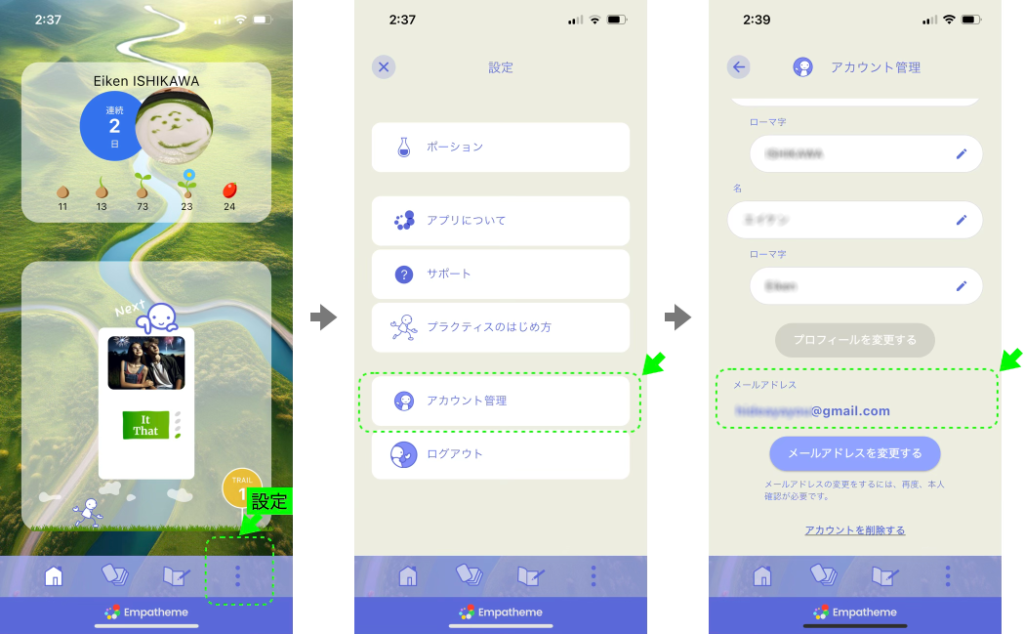
In the app, go to Settings > Account Management and check your registered email address.
⚫︎ About Practice
What is emp?

emp is Empatheme’s energy coin, earned through practice. You can exchange emp for Watering Pots. Water your Seed to receive advice from a tutor.
What is a Watering Pot?

A Watering Pot is used to nurture your voice Seed. When you water a Seed, a tutor sends advice based on your Rhythm Mirror.
Your first two Pots are free. One Watering Pot is used each time you receive advice.
Each Seed can be watered only once, and watering cannot be undone.
How do I use voice input when entering text?
Voice input is convenient when writing English in Listen or Review, and when entering comments. First, enable voice input in your smartphone settings.
▼ Step 01: Enable Voice Input on Your Smartphone
Enable voice input for both English and Japanese.
⚫︎ On iPhone
1. Open Settings > General > Keyboard.
2. Under Keyboards, add English (US).
3. Turn on Enable Dictation.
If prompted, tap Enable Dictation.
*Names and steps may vary depending on your device and OS version.
⚫︎ On Android
1. Open the keyboard or input method settings from Settings.
Example: Settings > System > Languages & input > On-screen keyboard.
2. Select Gboard.
If Gboard is unavailable, add it from Manage keyboards or a similar menu.
3. Turn on Voice typing.
4. Add English (United States) under Languages.
*If Gboard is unavailable, add it from Manage keyboards or a similar menu.
*Names and steps may vary depending on your device and Android version.
▼ Step 02: Use Voice Input in an App Field
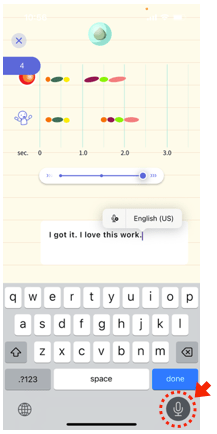
1. Tap the input field.
2. Use the globe icon to switch to the language you want to enter.
3. Tap the microphone icon.
4. Speak, and your voice will be converted into text.
What do the different Seeds—seed, sprout, and so on—mean when the capsule opens in Review?
Developing your English Ear° begins with how accurately you reproduce a spoken line.
English Ear° Trail uses five measures to accurately assess the difference between your performed line and the model.
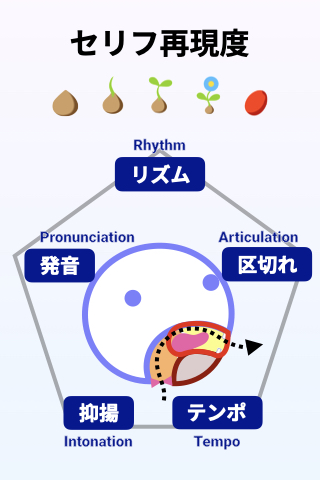
⚫ Rhythm : the overall flow of the line and the balance of long and short sounds
⚫ Articulation : how syllables connect and separate
⚫ Tempo : the duration and speed of the line
⚫ Intonation : changes in vocal pitch
⚫ Pronunciation : the accuracy and consistency of consonants, vowels, and all phonemes
When the capsule opens, the Seed changes as follows.
1. Seed

The line is still far from the model—for example, when you stumble, stop midway, include noise or extra sounds, or speak too quietly.
This also applies when Japanese or katakana-based patterns remain strong. The speech is not yet a complete English line that a listener can understand.
2. Sprout

The speech forms a line, but differences in rhythm, pronunciation, or duration—or sounds that are not yet clear—keep it from matching the model.
Voice input may recognize some of it, but in real conversation the line may not always be understood.
3. Leaf

The line sounds more like English and is approaching the model. It can be understood in conversation, and voice input displays the text almost correctly.
Make Leaf your consistent goal. Repetition in Learn is the key. Compare your voice many times in Mirror Mode and Slow Mode.
4. Flower

The five RATIP measures are well balanced and close to the model. The line has clear contrast, smoothness, and pronunciation.
If you feel you spoke well but did not reach Flower, something is still slightly off. Use Slow Mode to see, listen, and compare.
5. Fruit

Fruit appears when every aspect closely resembles the model. Repeat a Fruit Seed to make that feeling stick.
Even a native speaker will not automatically sound exactly like the model. Without rehearsal, their individual speaking habits appear.
With a little practice, however, native speakers can recall what they heard and reproduce it in the same way. This stability is the English Ear°.